Why we built AppX Go, our own app for opening your apps
Expo Go on the App Store moved on and stopped opening AppX apps on iPhone. So we built our own phone app. What broke, what was hard, and where it is now.
Ilyos Olimov · · 6 min read

AppX has always promised one thing above everything else: you describe an app, and a few minutes later you hold it on your own phone. Not a picture of an app. The real thing, with buttons you can tap.
For most of this year, that promise ran through Expo Go, a free app from the Expo team. You scanned a QR code, Expo Go opened your app. I even wrote a whole post about why we chose it.
This month I decided we need our own app instead. It is called AppX Go. It is built, it works, and as I write this it is waiting for review in the App Store and Google Play. Here is why, what was hard, and what it looks like.
What broke
Every app AppX builds uses version 54 of Expo's toolkit (people call it SDK 54). Each build of Expo Go supports exactly one of these versions.
On September 2, Expo Go on the App Store moved to SDK 57. It skipped 55 and 56 completely. Google Play had already moved in August. From then on, the Expo Go you download from a store can no longer open an SDK 54 app.
On Android there is a workaround: you can install an older Expo Go build directly from Expo's site. On iPhone there is none for normal people. The only official route is to build your own copy of Expo Go and install it through TestFlight with a paid Apple developer account.
There was a second problem behind the first one. Expo Go on iPhone now also wants you signed in to the same Expo account as the computer running the app. Our preview servers don't work that way. So even if we upgraded every project to SDK 57, iPhone would still not open them.
I found this on October 6, not from a user report, while writing an article that told people to open their app in Expo Go. Our site said "open it on your iPhone with Expo Go", and for anyone installing Expo Go from the App Store that no longer worked. That same day we changed the preview page: every phone now opens the app in its browser, and Android users get the Expo Go link that still works. Honest, but not what I promised.
Why not just upgrade?
Upgrading every project to SDK 57 would take two to three weeks of work. Some things we rely on were removed or changed in between. And the stores would move again: SDK 58 was already in beta. We would be chasing Expo Go forever, and the sign-in problem would still be there.
So the real fix was to stop depending on someone else's app. If AppX has its own phone app, built on the same SDK as the apps we generate, the two can never drift apart again.
What AppX Go does
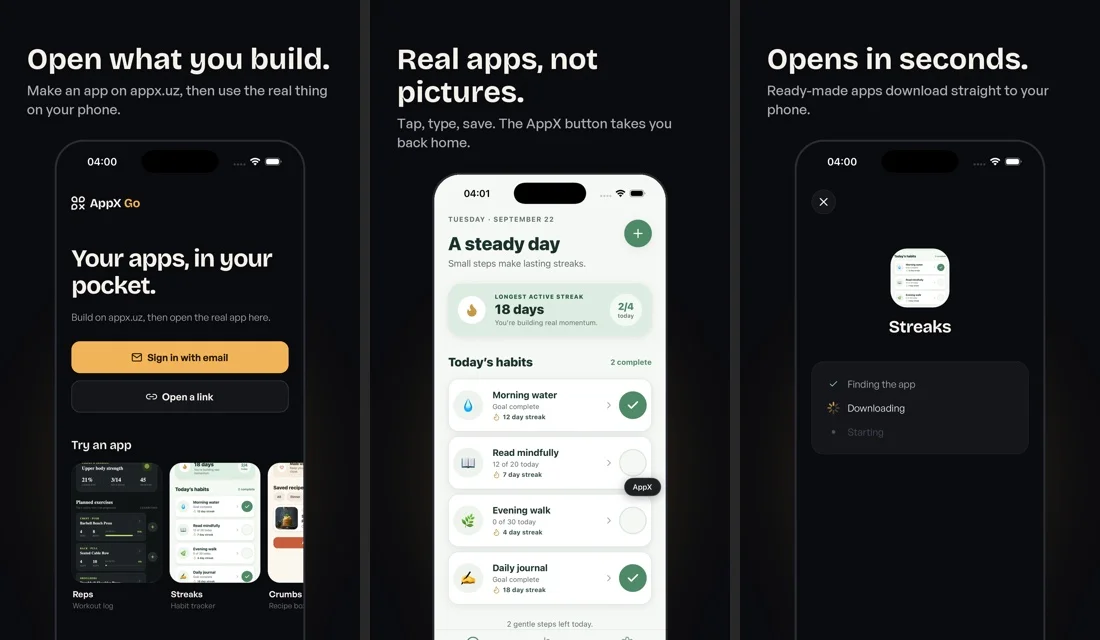
- Your apps in one list. Sign in with a 6-digit code from your email and every app you built on appx.uz is there. Tap one and it opens.
- Try an app in one tap. Ready-made examples from our gallery: a workout log, a habit tracker, a recipe box and more.
- Open a shared link. Someone sends you an appx.uz preview link, it opens in AppX Go.
- Back home any time. A small AppX button sits at the edge of the screen and takes you back to your list.
It speaks English, Russian and Uzbek, and it is free.
What was hard
Opening one app inside another, legally. Expo has a tool for loading an app into a host app, but on iPhone it only works in debug builds, and debug builds can't go to the App Store. So we wrote our own small native module that does the swap: it shuts down the home screen, starts the user's app in its place, and reverses it when you tap the AppX button. It is the only native code in AppX Go. Everything else is React Native, like the apps AppX builds.
Making each app believe it is itself. An app reads its own name, colors and settings when it starts. Inside a host app, it would read the host's instead. We had to hand every app its own settings at the moment it opens.
Sleeping servers. At first AppX Go loaded apps from the live preview server we use in the builder. Those servers sleep when nobody is editing. When I tested opening an app with the builder closed, it just said "building" forever. It turned out 110 live projects had no server record at all, so nothing could wake them from a phone.
The fix changed the design. Now, every time AppX publishes your app's web preview, it also publishes a ready-to-run copy for iPhone and one for Android. AppX Go downloads that copy and runs it. No server has to wake up first. The live server is only needed while you are editing.
Small things that crash a whole app. If the phone receives the app's code with the wrong file type, the iPhone doesn't show an error, it closes everything. An old cached file made an app open its previous version. One font showed every weight as regular because of a hidden name inside the font file. And if a user's app crashes, it should not take AppX Go down with it, so now a crash sends you back to your list with a short note.
The stores themselves. Apple and Google both require a way to delete your account inside the app, so that exists now. Both needed privacy answers, screenshots, descriptions in several languages and a test account for their reviewers. Apple's login kept failing with server errors, so we switched to an API key. None of it is difficult, but there is a lot of it.
Where it is now
- Tested on iPhone with real AppX apps: opening, typing, saving, charts, tabs, Cyrillic text, going to the background and back. Opening and closing apps again and again doesn't grow its memory use.
- The Android version is built and in Google Play internal testing; next is a round of testing on real Android phones.
- Available to our own team through TestFlight and Google Play internal testing.
- Submitted for review to the App Store and Google Play. Apple and Google decide when. Apple in particular has rules about apps that run downloaded code, so I am not promising a date.
What comes next
As soon as both stores approve it, we will announce AppX Go properly, with links, and update every page on appx.uz that still mentions Expo Go. Until then, the preview link still opens your app in the phone's browser, and the builder works as before.
If you want to hear the day it is out, write to support@appx.uz and I will tell you. And if something breaks once it is out, tell me too. That is how this post started.
Keep going
More practical ways to move your app forward.
- How to describe your app to AI: a prompt template
Write a clear AI app-builder prompt with a copyable template, a practical example, acceptance checks, and focused follow-up edits.
- How to turn a client brief into a mobile app prototype
Turn a client brief into a mobile app prototype with a copyable AppX prompt, a practical test checklist, and a focused client-feedback workflow.
- The 5-backtick fence: stopping prompt injection via Markdown
We ship user input into an LLM architect prompt every turn. A reviewer caught that a 4-backtick string from the user could close our 3-backtick fence and run arbitrary instructions on the model. The fix is one weird Markdown trick.
- Investigators before builders: a 2-phase LLM workflow
Most teams dispatch coding agents straight to the build. We run a read-only investigator phase first — and the findings have rewritten our plan in 30-40% of cases. Here's the shape, the brief format, and what to do when findings contradict the plan.
- Step 0: delete dead code before you refactor with an LLM
Every byte you load into an LLM agent's context is a byte it has to keep track of. Dead code looks like signal — and agents preserve, extend, or mimic it. Our rule: a pure-deletion commit before any structural refactor of a file over 300 LOC.
Ready to try your idea?
Start with a clear description. AppX will help you turn it into an app you can test.